Cheap computer repair: 2025 Affordable Secrets
Why Affordable Computer Repair Matters More Than Ever
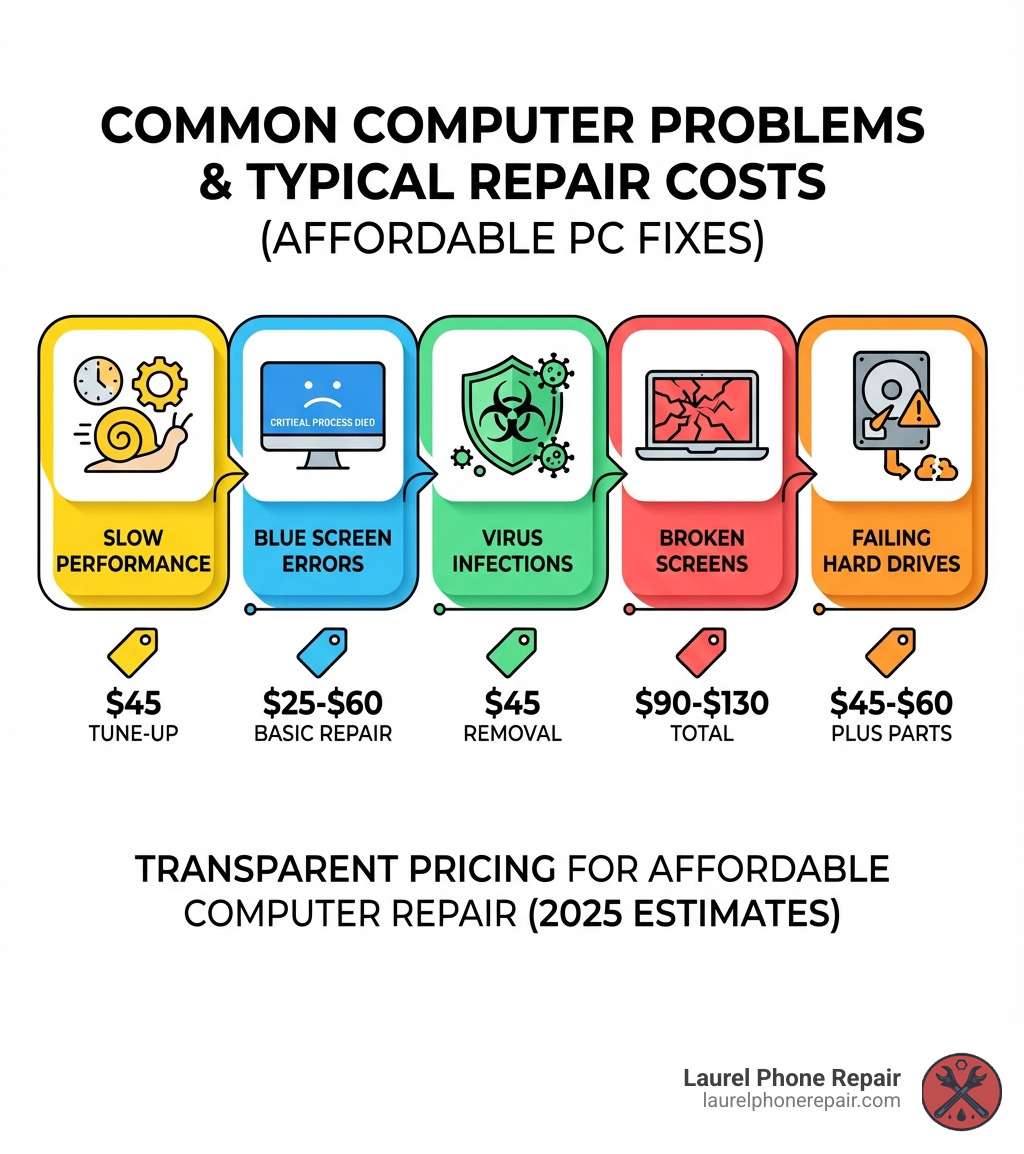
Cheap computer repair doesn’t have to mean low-quality service. Here’s what you can expect to pay for common fixes:
| Service Type | Typical Cost Range |
|---|---|
| Basic Repairs | $25-$60 |
| Virus Removal | $45 |
| Screen Replacement (Labor) | $35-$55 + parts ($60-$75) |
| Diagnostic Fee | $39 (sometimes free) |
| Hourly Rate | $60/hour standard, $120/hour expedited |
We’ve all been there. Your computer freezes mid-project, won’t turn on, or crawls so slowly you could make coffee while waiting for a program to open. The frustration is real, and the fear of sky-high repair bills makes it worse.
But here’s the truth: affordable computer repair is absolutely possible when you know where to look and what to ask for.
Many repair shops now offer flat-rate services, free diagnostics, and transparent pricing that won’t shock you at checkout. According to the research, basic repairs often start as low as $25, and many shops will give you a free estimate before touching your device. The key is understanding what you’re paying for and avoiding unnecessary upsells.
As Ralph Harris, with over 20 years in electronics repair and more than 500 Apple certifications, I’ve seen countless customers overpay for cheap computer repair services that should have cost half the quoted price. My goal is to help you make informed decisions and get your device fixed without emptying your wallet.
Understanding Computer Repair Costs
When your computer decides to take an unscheduled vacation, the first thing that often comes to mind is, “How much is this going to cost me?” It is a valid concern, and thankfully, finding transparent pricing for cheap computer repair is becoming easier. We believe in clear, upfront costs so you know exactly what to expect.
Generally, repair costs are broken down into diagnostic fees, flat-rate services for common issues, or hourly rates for more complex problems. Many reputable shops in Laurel, Hattiesburg, Jackson, and Jones County, Mississippi, will offer free estimates, which is always a good sign of their commitment to customer satisfaction. You can always check our own Computer Repair Pricing to get an idea of what we offer.
What is the Average Price for Basic Repairs?
For many common computer glitches, you might be pleasantly surprised by the affordability. Basic computer repairs, which often cover minor software tweaks or quick fixes, can start as low as $25. Some services might even offer a wide variety of computer repairs for a flat labor fee of $55, covering all labor for specific issues. This means you are paying for the technician’s time and expertise, regardless of how long the actual fix takes within that service category.
However, it is important to understand diagnostic fees. Some shops, including some we have researched, charge a diagnostic fee, which can be around $39 (or even $50 for Macs). This fee covers the technician’s time to thoroughly examine your device, identify the root cause of the problem, and provide you with a quote. While some diagnostic fees are non-refundable, many shops will credit this fee toward the total repair cost if you decide to proceed. The good news? We pride ourselves on offering free diagnostics for your device, ensuring our diagnostic exams do not cost a dime. This way, you get a clear picture of the problem and its solution without any initial financial commitment.
Are There Extra Charges for Specific Services?
Yes, specific repairs often come with their own pricing structure, which can include additional charges beyond a basic repair fee. This is especially true for services that require specialized parts or more intricate labor.
Here is a comparison of common repair costs you might encounter:
| Service Type | Typical Cost Range | Notes |
|---|---|---|
| Basic Repairs | $25-$60 | Covers minor software fixes and quick adjustments. |
| Virus Removal | $45 | Flat fee for removing malware, viruses, and spyware. |
| Screen Replacement (Labor) | $35-$55 | Labor cost only; parts generally range from $60-$75. |
| Data Recovery (Basic) | Varies, often starting around $60 | Pricing depends on the severity of drive damage and amount of data to be recovered. |
| Services Requiring Opening the Case | $45 | Applies to repairs such as RAM or hard drive upgrades and internal cleaning; parts are additional. |
| Diagnostic Fees | Details | |
|---|---|---|
| Basic Diagnostic | $39 | This fee is generally non-refundable but may be credited toward the final repair cost. Some services, like ours, offer free diagnostics. |
| Mac Diagnostic | $50 | Macs sometimes have higher diagnostic fees due to specialized knowledge and tools. |
| Express Diagnostic | $75 | Moves your device to the front of the queue for quicker assessment. |
You are probably thinking, “Wait, some say free, some say $39. What gives?” It really depends on the service provider. Many reputable local shops, including ours in Laurel, Hattiesburg, Jackson, and Jones County, Mississippi, understand that finding out what is wrong should not cost you an arm and a leg. That is why we offer free diagnostics. It is our way of providing transparent and cheap computer repair from the very first step.
Are There Extra Charges for Specific Services?
Beyond the initial diagnostic, specific repairs will, of course, have their own costs. These usually involve parts and specialized labor. For instance, services that require opening up the laptop’s case often incur an additional charge, typically around $45, due to the intricate nature of the work.
Let us look at some common services and their associated costs:
| Repair Service | Typical Cost (Labor) | Typical Part Cost (Estimated) | Total Cost Range (Estimated) | Notes |
|---|---|---|---|---|
| Virus Removal | $45 | N/A | $45 | A flat fee for cleaning out malicious software. |
| Screen Replacement (Laptop) | $35-$55 | $60-$75 | $95-$130 | Labor for replacing the screen plus the cost of the new screen itself. |
| Services Requiring Opening Laptop | $45 | Varies | $45 + parts | Applies to repairs like RAM upgrades, hard drive replacements, or fan cleaning. |
| Basic Computer Repairs | $25 | N/A | $25 | Minor software fixes and quick adjustments. |
| All-Inclusive Labor | $55 | Varies | $55 + parts | Some services offer this for a range of repairs, covering all labor for that specific service type. |
As you can see, costs can vary. A virus removal might be a straightforward $45, getting rid of those pop-ups and performance issues. However, if your laptop screen looks like it lost a fight with a hammer, you are looking at the labor cost (around $35-$55) plus the price of a new screen, which generally runs $60-$75. For a complete screen replacement, you are likely in the $95-$130 range. We aim to keep these costs as low as possible, providing high-quality parts and expert service without the premium price tag.
Your Guide to Finding Cheap Computer Repair
Finding cheap computer repair doesn’t mean you have to compromise on quality. It’s about being informed and choosing a service that values transparency and customer satisfaction as much as we do. Whether you’re in Laurel, Hattiesburg, Jackson, or Jones County, Mississippi, there are options to get your device back in working order without emptying your wallet.

Exploring Your Repair Options
When your computer is on the fritz, you have a few ways to get it seen by a professional:
-
In-store Drop-off: This is perhaps the most common and convenient option for many. You simply bring your ailing device to a local repair shop. This allows technicians to perform comprehensive diagnostics and repairs in a controlled environment. Most of our customers choose this for its simplicity and efficiency.
-
On-site Service: For businesses or individuals who can’t easily transport their computer, some repair services offer on-site visits. This means a technician comes directly to your home or office. While incredibly convenient, this service often comes with a higher hourly rate due to travel time and the technician’s dedicated presence. If you need a quick fix for a network issue or a software setup at your business, this can be a lifesaver.
-
Mail-in Services: While less common for general cheap computer repair, some specialized services or warranty repairs might offer mail-in options. However, for most immediate or complex issues, dropping off your device locally is often faster and more secure. One of the research sources noted that mail-in service was not available except for warranty issues, which highlights its limited applicability for everyday repairs.
-
Local Repair Shops: These are your go-to for quick, reliable, and often more affordable computer repair. They offer personalized service, competitive pricing, and the convenience of being able to speak directly with the technicians. This is where you’ll often find the best value and support for your specific needs.
How to Find a Trustworthy and Cheap Computer Repair Service
Navigating computer repair can feel like a minefield, but with a few key strategies, you can find a trustworthy and cheap computer repair service that won’t leave you feeling ripped off.
-
Check for Warranties: A reputable repair shop stands behind its work. Always ask about their warranty or guarantee policies. Many, including us, offer a 1-year limited warranty on most repairs, covering both parts and labor. This provides peace of mind that if the same issue reappears, you won’t be paying twice.
-
Read Online Reviews: The internet is your friend here. Check Google reviews, Yelp, or even Facebook pages for local repair shops. Pay attention to comments about pricing, turnaround times, and customer service. A consistent pattern of positive feedback usually indicates a reliable business.
-
Ask About Part Quality: This is crucial, especially for hardware repairs like screen replacements or battery swaps. Inquire whether they use OEM (Original Equipment Manufacturer) parts or high-quality aftermarket parts. OEM parts are identical to the original components in your device, while aftermarket parts are produced by third-party manufacturers. Both can be good, but understanding the difference allows you to make an informed decision based on your budget and preferences. We believe in transparent part options, letting you choose what’s best for your device and wallet.
-
Look for Transparent Pricing: As mentioned earlier, a good sign of a trustworthy repair service is upfront and clear pricing. Avoid shops that are vague about costs or refuse to give you an estimate before starting work. We offer free diagnostics and clear pricing, so there are no surprises when it’s time to pick up your repaired computer.
Questions to Ask Before You Commit to a Cheap Computer Repair
Before you hand over your precious device, arm yourself with these questions to ensure you’re getting the best and most affordable computer repair service:
- What is the estimated turnaround time? You need your computer back, right? Ask how long they expect the diagnostic process to take and then how long the actual repair will be. Diagnostics typically take 2-3 days, with repairs often adding another 1-2 days. That special order parts can cause delays, sometimes even up to a month, depending on the manufacturer.
- Do you offer a warranty? Confirm their warranty policy, what it covers (parts, labor, or both), and for how long. A 1-year limited warranty on most repairs is a good standard to look for.
- Are there any discounts available? It never hurts to ask! Some shops offer student discounts, senior discounts, or promotions for new customers. You might just snag an even cheaper computer repair.
- What computer brands do you service? While many shops handle a wide range of PCs and laptops, it’s good to confirm they are familiar with your specific brand, whether it’s Dell, HP, Lenovo, Acer, Asus, or another popular manufacturer. This ensures they have the right tools and expertise.
By asking these questions, you empower yourself to choose a service that’s not only affordable but also reliable and transparent.
Common Problems and Their Repair Solutions
Our computers are complex machines, and when they act up, it can be due to a myriad of issues, broadly categorized into software and hardware problems. Understanding these common woes can help you communicate effectively with your technician and get the most affordable computer repair solution. For more details on our offerings, you can visit our Services page.
Software, Virus, and Malware Removal
Software issues are often the culprits behind slow performance, strange pop-ups, or system crashes. The good news is, these are frequently among the more cheap computer repair options.
- Operating System Re-installation: Sometimes, the OS itself gets corrupted or bogged down with too many conflicting programs. A fresh install can make your computer feel brand new again.
- Bloatware Removal: Those new computers from big box stores often come pre-loaded with unnecessary software (bloatware) that slows them down. Removing this can significantly improve performance. Our expert technicians help you regain wasted resources by removing this unwanted software.
- Performance Tune-ups: Over time, your computer accumulates temporary files, registry errors, and fragmented data. A thorough tune-up can optimize your system, making it faster and more responsive.
- Virus and Malware Scans: Ah, the dreaded digital pests! Viruses, malware, and spyware can wreak havoc, leading to data theft, system instability, and irritating advertisements. We offer comprehensive virus removal services for a flat fee of $45, ensuring your system is clean and secure.
Hardware Replacements and Upgrades
Hardware problems tend to be more physically apparent and can sometimes involve a bit more cost due to parts. However, often replacing a single component is far more cost-effective than buying a new computer, making it a smart cheap computer repair choice.
- Screen Replacement: A cracked or broken laptop screen is a common accident. Instead of replacing the entire laptop, we can swap out just the screen. As we mentioned, labor is typically $35-$55, plus the cost of the screen (around $60-$75).
- Keyboard Replacement: Spilled coffee? Missing keys? A new keyboard can make your laptop feel usable again.
- Solid-State Drive (SSD) Upgrades: If your computer is slow to boot or load programs, upgrading from a traditional hard drive to a solid-state drive is one of the best performance boosts you can get. It’s like giving your computer a new lease on life!
- RAM Upgrades: Need to multitask more efficiently? Adding more RAM (Random Access Memory) allows your computer to handle more programs simultaneously without slowing down.
- Power Jack Repair: If your laptop isn’t charging or the power cord feels loose, a faulty power jack might be the issue. This is a fixable problem that keeps your device powered up.
- Motherboard Replacement: While one of the more intensive hardware repairs, a motherboard replacement can save a valuable computer from the scrap heap if the core logic board is the problem.
Data Recovery and Backup Solutions
Losing important files can be devastating. Whether it’s cherished family photos or critical work documents, data recovery is a specialized service that can often retrieve what you thought was lost forever.
- Recovering Lost Files: Hard drive failures, accidental deletions, or even system crashes can lead to data loss. Our data recovery services aim to retrieve as much data as possible from damaged or corrupted drives. We can recover data from hard disk drives irrespective of the model or make, interface or file system/operating system.
- Hard Drive Failure: If your hard drive is making strange clicking noises or your computer won’t boot, it could be a sign of impending or actual hard drive failure. Acting quickly can increase the chances of successful data recovery.
- Importance of Regular Backups: This cannot be stressed enough! The best data recovery is the one you never need because you have a backup. We can help set up comprehensive, automated, and encrypted data backups, often stored off-site, to protect your valuable information from future mishaps.
Frequently Asked Questions About Affordable PC Repair
We understand you have questions, especially when looking for cheap computer repair. Here are some of the most common inquiries we receive:
How long do most computer repairs take?
The turnaround time for computer repairs can vary based on the complexity of the issue and the availability of parts. Generally, here’s what you can expect:
- Diagnostic Time: Typically, diagnosing the issue takes about 2-3 days. This allows our technicians to thoroughly test your device and pinpoint the exact problem.
- Repair Time: Once diagnosed, the actual repair usually takes an additional 1-2 days. These estimates are for most cases, but some situations can be faster or take longer.
- Delays for Special Order Parts: If your repair requires a specific part that isn’t in stock, we’ll need to order it. This can extend the repair time significantly, sometimes up to a month, depending on the manufacturer and shipping.
- Expedited Service Options: If you’re in a hurry, some services offer expedited or priority service. For instance, an express fee of $75 might bump your device to the front of the queue, making it the next one in line for repair. Hourly rates for emergency service can be higher, around $120/hr, for immediate attention. We understand that sometimes, you just can’t wait!
Do repair shops offer warranties on their work?
Absolutely! A reliable repair shop, like ours, will always offer warranties on their work. This is a cornerstone of trustworthy service and ensures your peace of mind.
- Warranty Policies: Most reputable services provide a 1-year limited warranty on the majority of repairs. This means that if the same issue arises within that timeframe due to faulty parts or workmanship, the repair will be covered.
- What Warranties Cover: Generally, warranties cover both the parts used in the repair and the labor performed by the technicians. It’s always a good idea to confirm the specifics of what is covered and for how long. This commitment to quality is a key part of providing truly affordable computer repair—you only pay once for a lasting fix.
What types of computers can be repaired?
The good news is that most local repair shops are equipped to handle a wide variety of computers. Our experienced technicians can repair:
- PC and Laptop Repair: This includes virtually all brands of desktop and laptop PCs. Manufacturers we service include, but are not limited to, Acer, Alienware, Asus, Dell, Gateway, Gigabyte, HP, Lenovo, Samsung, Sony, and Toshiba. If it plugs in, we’ll fix it!
- Apple Product Repair: While some shops may have limitations, many services also repair Apple computers, including MacBooks and iMacs. It’s always best to inquire directly with your chosen repair service if you have an Apple device, as specialized tools and parts are often required.
Whether you have an old workhorse desktop or a sleek modern laptop, chances are we can get it back up and running. Our goal is to provide comprehensive and cheap computer repair solutions for everyone in Laurel, Hattiesburg, Jackson, and Jones County, Mississippi.
Get Your Computer Fixed Without Breaking the Bank
Navigating computer repair doesn’t have to be a stressful or expensive ordeal. As we’ve explored, cheap computer repair is not only possible but also accessible when you know what to look for. By understanding typical costs, asking the right questions, and choosing a transparent service provider, you can get your device fixed without breaking the bank.
Remember these key takeaways:
- Free diagnostics can save you money right from the start.
- Flat-rate services and clear pricing for common issues help avoid surprises.
- Warranties on parts and labor offer peace of mind.
- Local repair shops often provide the best value and personalized service.
We pride ourselves on offering quick, affordable, and high-quality electronics repairs right here in Laurel, Hattiesburg, Jackson, and Jones County, Mississippi. Our experienced technicians are dedicated to transparent part options (OEM vs. aftermarket) and ensuring high customer satisfaction with comprehensive warranties. We believe in getting your computer back to you swiftly and affordably, so you can get back to what matters most.
Don’t let a malfunctioning computer disrupt your life any longer.
Schedule your affordable computer repair today and let us help you get your device running like new again! You can also check out our Pricing and Services for more information, or reach out to our Support team with any questions.